What this extension does
| Feature | Operation / output |
|---|---|
| List collection | Read recognizable list products; pagination merges and deduplicates, while normal rereads update the list. |
| Product details | Read visible fields, images and descriptions for one item and use available copy controls. |
| Point-and-pick | Select source-page cards instead of collecting the entire page. |
| Filters and pagination | Use the installed version’s minimum thresholds and manual-mode pagination within permitted access. |
| CSV and images | Export list text/URLs as CSV; save images separately under download settings, without implied commercial reuse rights. |
Recognize the actual interface
Captured on October 27, 2026. The installed interfaces are in Chinese. Only necessary UI is shown; product and private contents are blurred or covered. Select an image to open it at full size.
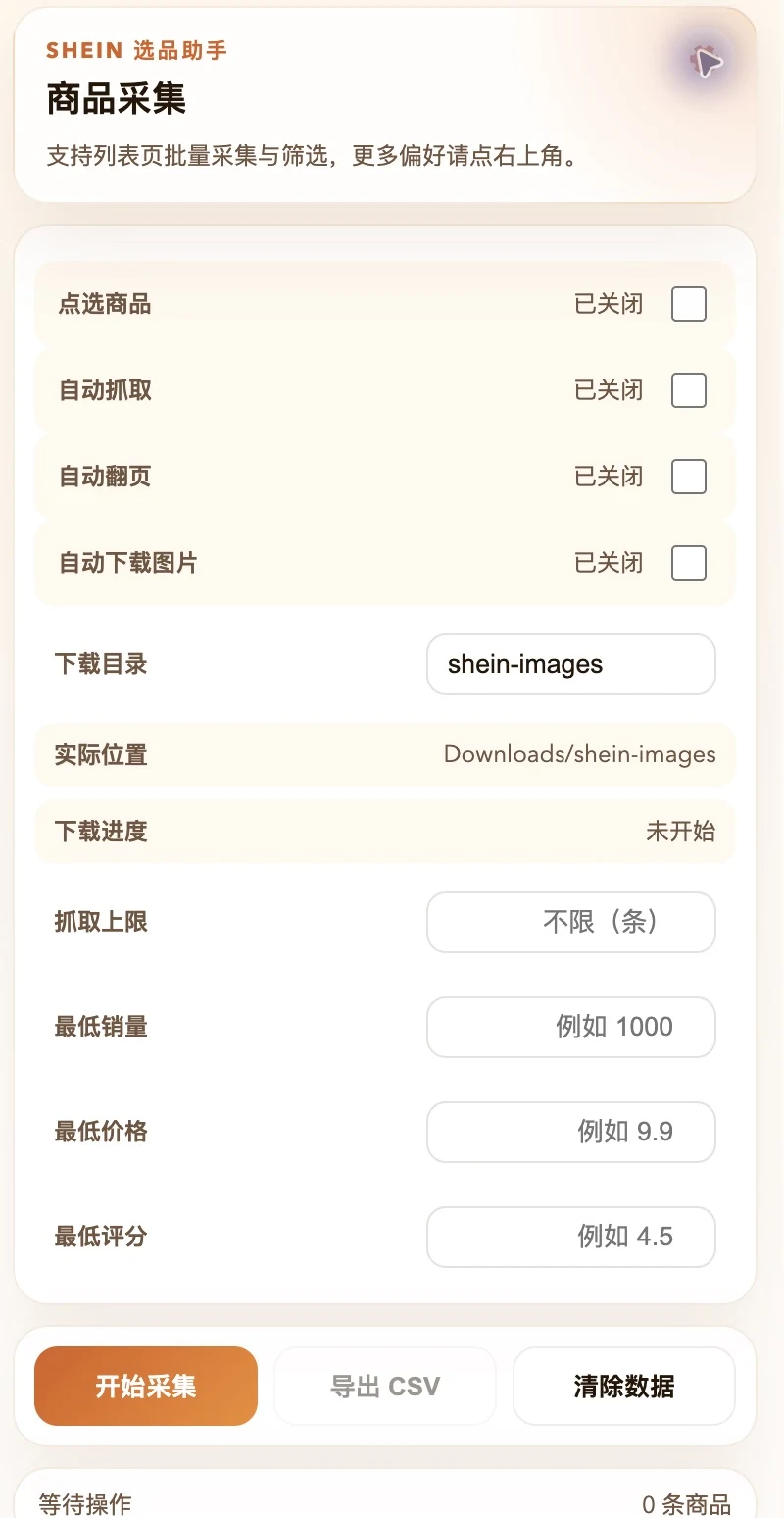

Get started step by step
Installation and page selection
There is no public SHEIN Web Store link here yet. With extension files already supplied, use Chrome Developer mode to load the SHEIN folder containing manifest.json, then refresh shein.com. Open the product list or detail page you want to organize, then select Start collection in the side panel.
Manual first, automatic second
Use the gear menu for point-and-pick, auto-collection, pagination, image downloads and minimum sales, price and rating. Collect your current list, then configure filters and automatic options for your workflow.
What does every feature and setting do?
33 entries for SHEIN. Choose an interface area, then a control. Each entry explains purpose, behavior, an example and its effects.
Collection and list controls
Operate these controls after opening the side panel on a product page. List and detail views expose different actions.
Floating launcher / Start collection
- Purpose
- Access extension actions directly on the source page.
- Behavior and settings
- Expand the floating icon. Open side panel opens the panel; Start collection queues a current-page collection command for it.
- Example
- Use it from a category you are browsing, then inspect panel status.
- Effects and limits
- Unsupported or not-yet-loaded pages may have no launcher. This does not start background whole-site collection.
Open side panel / Open collection panel
- Purpose
- Keep collection controls and results beside the source page.
- Behavior and settings
- Use the floating page entry or the extension toolbar entry. The popup offers quick preferences; the side panel shows full results. Check the active marketplace after switching tabs.
- Example
- Open the panel beside a category list to compare source cards with collected records.
- Effects and limits
- Opening the panel does not make every page recognizable or create an Excel batch.
Settings / Collection settings
- Purpose
- Configure collection mode, filters and image downloads.
- Behavior and settings
- The top-right gear expands or collapses preferences. Inputs and switches apply individually; collapsing preferences does not erase results.
- Example
- Leave automatic tasks off for an initial small collection, then adjust the needed controls.
- Effects and limits
- List-only filters and selection may be hidden in detail view. The toolbar popup contains only a subset of the full side-panel settings.
Start collection
- Purpose
- Read recognizable, loaded product cards on the current supported page.
- Behavior and settings
- A normal manual read replaces the list with current-page results. Pagination reads merge with the existing list and deduplicate links. A running read is not started again.
- Example
- Let one page load, then click once. Export a previous list first if you need to retain it.
- Effects and limits
- This is not a whole-site search or cloud task. Unloaded cards, strict filters or an unavailable source can return zero. The button is disabled during point-and-pick.
Status / Product count
- Purpose
- Distinguish collection, completion, filtering and errors.
- Behavior and settings
- A count such as 12/40 means 12 visible records out of 40 held records. CSV exports the visible selection. Read the status text as well as the count.
- Example
- If the count drops after changing minimum rating, check whether it reports visible versus total records.
- Effects and limits
- Product count is neither sales volume nor page count. One product in detail view can contain many fields.
Select a result card
- Purpose
- Match a side-panel record with its source-page product.
- Behavior and settings
- Clicking a list card attempts to locate and highlight that product on the current page. Use the source page’s own product link when you want to enter its detail page.
- Example
- Locate a source card when checking an unexpected price.
- Effects and limits
- This operates on the current page. Navigation, virtualized lists or removed cards may prevent a match.
Export CSV
- Purpose
- Save the currently visible, filtered list as a text spreadsheet.
- Behavior and settings
- The button generates UTF-8 CSV with one visible product per row and separate data columns. Images are URLs. The control is disabled for zero records; detail view uses copy actions instead.
- Example
- Filter by rating, export your shortlist and import it using UTF-8 with comma separation.
- Effects and limits
- CSV embeds no images and preserves no Excel formatting or source workbook. Hidden records are excluded. Import long IDs as text to avoid scientific notation.
Clear data / Clear detail
- Purpose
- Empty current panel results before another collection.
- Behavior and settings
- Clears the list or detail and resets its filters. Exported files, downloaded images and persistent preferences are not all deleted. Enabled automatic tasks may repopulate results.
- Example
- Export CSV before clearing. Turn automatic tasks off first if you want collection to stop.
- Effects and limits
- Do not use the panel as a backup recovery mechanism. Ozon batches and source workbooks are managed separately.
Every collection preference
Unless stated otherwise, these configure the manual side-panel list. Filters generally change visibility; they do not supply data absent from the source.
Point-and-pick
- Purpose
- Collect only cards you deliberately select, suitable for a small manual shortlist.
- Behavior and settings
- Enable it and click source cards repeatedly. New selections appear first; selecting the same link again moves it to the front. Turn it off to restore normal clicks. Whole-page collection is disabled while it is active.
- Example
- Pick three candidates instead of collecting every card on a page.
- Effects and limits
- Filters can still hide selected products. Selected items may trigger enabled image downloads. This is not a site-wide checkbox selection.
Auto-collection
- Purpose
- Refresh the current list without repeatedly clicking Start.
- Behavior and settings
- Enabling it triggers an immediate read, then attempts another roughly every five seconds. Reads do not overlap. It does not click Next; each read updates the current list.
- Example
- Use briefly when a permitted list is loading more cards, then turn it off.
- Effects and limits
- This is periodic reading, not a change-only trigger. It can replace picked or previous-page lists. Disabling it does not disable pagination.
Automatic pagination
- Purpose
- Visit further products on supported lists with less manual navigation.
- Behavior and settings
- Attempts Next, waits for loading and merges the next read into existing records with deduplication. Stops when no next control is found or the collection limit is reached. Detail view turns list pagination off.
- Example
- Collect the first page, set a small limit, then enable pagination. Turn it off and inspect results when finished.
- Effects and limits
- A recognizable Next or Load more control must exist. Enabling pagination cannot repair an unsupported page. Stop on verification or access restrictions.
Automatically download images
- Purpose
- Send collected image URLs to Chrome for saving.
- Behavior and settings
- Off initially. Enabling waits for another collection. List reads use visible products; detail reads use parsed main images. Editing a filter alone does not download all earlier images.
- Example
- Leave off for text research. Enable after checking the shortlist and folder, then run a collection.
- Effects and limits
- May create many files and requests. Picked items have their own trigger path, so do not assume a filtered-out selection cannot download. Check Chrome Downloads for final file status.
Download directory
- Purpose
- Choose a subfolder beneath the browser download directory.
- Behavior and settings
- Defaults to shein-images. Enter a relative folder such as research/session-a and finish editing. Invalid path characters are normalized; blank input restores the default.
- Example
- Use research/session-a to separate one collection’s files from other work.
- Effects and limits
- This cannot write to an arbitrary absolute system path. Changing it affects future downloads and does not move or rename existing files.
Actual location
- Purpose
- Preview the destination implied by the folder preference.
- Behavior and settings
- For example, Downloads/research/session-a. This read-only label follows Download directory.
- Example
- Look for the indicated subfolder, then verify individual files in Chrome Downloads.
- Effects and limits
- Downloads describes the browser destination convention, not a guaranteed system folder; your browser configuration still controls its download root.
Download progress
- Purpose
- See whether image work started and how many requests succeeded, failed or were skipped.
- Behavior and settings
- Off means disabled; Waiting means no new trigger. Skips can reflect deduplication or download history. Investigate failures in Chrome and at the source.
- Example
- If collection worked but no files appeared, check for skipped requests and inspect Chrome Downloads.
- Effects and limits
- Image counts differ from product counts. Some panel versions count accepted download requests, so Completed alone does not prove every file finished writing. Clearing products does not clear download history.
Collection limit
- Purpose
- Set a product-count stopping condition for list pagination.
- Behavior and settings
- Blank or 0 means no limit. List reads are capped before display filtering; pagination stops when the unfiltered count reaches the limit. This does not cap Ozon Excel batches or enforce a hard limit on picked items.
- Example
- With limit 100 and minimum rating 4.5, pagination may stop at 100 raw records even if only 20 pass the rating filter.
- Effects and limits
- Counts products, not pages, files or images. Lowering the limit cannot recover previously omitted records. TEMU can return more than the threshold in one read.
Minimum sales
- Purpose
- Hide list products whose displayed sales value is below a threshold.
- Behavior and settings
- Enter a non-negative number; blank disables the condition. Recognized k/thousand and similar units are normalized. Unrecognized sales participate as 0.
- Example
- At threshold 1000, a recognized 1.2k can pass; products with no displayed sales may disappear.
- Effects and limits
- No private sales database is queried. Reviews are not sales. Source labels can represent monthly, cumulative or approximate values; verify their meaning.
Minimum price
- Purpose
- Set a lower displayed-price threshold to exclude cheaper candidates.
- Behavior and settings
- Accepts non-negative decimals. Compares the recognized page number in its displayed currency, without currency conversion. Blank disables it; missing prices may be treated as 0 and excluded.
- Example
- At threshold 10, 8.5 is hidden and 12 can remain. This does not select products priced below 10.
- Effects and limits
- Not a maximum price, cost price or delivered total. Check coupons, memberships and variants. All active thresholds must pass together.
Minimum rating
- Purpose
- Hide lower-rated list products to narrow manual review.
- Behavior and settings
- Accepts 0–5 with 0.1 increments; out-of-range input is clamped. Blank disables filtering. Missing ratings compare as 0.
- Example
- With 4.5, a 4.4 is hidden while 4.5 and 4.8 can pass; combine with sales if useful.
- Effects and limits
- Compares displayed rating only, without adjusting for review count or authenticity. High scores based on few reviews can still pass.
Detail-view copy functions
Open a supported product detail page for parsing, or use Reparse detail. These actions copy text or links and do not place orders.
Reparse detail
- Purpose
- Read the current product again instead of appending to a list.
- Behavior and settings
- Rebuilds the title, pricing, rating, description and image view. Detail mode shows one product and hides list filters and CSV.
- Example
- Reparse after selecting a variant or allowing the page to finish loading, then compare with the source.
- Effects and limits
- Only currently loaded content is parsed. Async sections or variant prices may lag. Detail view replaces the list view, so export a needed list first.
Product title: click to copy
- Purpose
- Copy the recognized title on its own.
- Behavior and settings
- Click the marked title area to write text to the clipboard. Status reports success; select text manually if copying fails.
- Example
- Paste a title into your research notes as a search reference.
- Effects and limits
- Keeps the page language without translating, rewriting or assessing trademark rights.
Price: click to copy
- Purpose
- Copy the displayed price and any recognized original price.
- Behavior and settings
- The price section copies combined text, including an original price only when recognized. Ozon batch dual prices have dedicated fields.
- Example
- Compare with your own costs while retaining currency and offer conditions.
- Effects and limits
- Not a checkout quote. Shipping, tax, account offers, quantity and variants can change the payable amount.
Ratings and sales: click to copy
- Purpose
- Copy recognized rating, review count and sales information together.
- Behavior and settings
- Click the section to copy available values. Missing metrics are not estimated.
- Example
- Record review volume alongside rating when evaluating a candidate.
- Effects and limits
- Reviews, product sales and store sales are distinct and cannot substitute for verified transaction data.
Single image / Copy all links
- Purpose
- Copy main-image URLs into your own records.
- Behavior and settings
- Click a thumbnail for one URL, or Copy all links for newline-separated recognized URLs. Use download settings when files are needed.
- Example
- Copy one thumbnail URL for a reference, or all links for the recognized gallery.
- Effects and limits
- Copies URLs rather than files or usage rights. Sources may restrict or expire links. Long description images, videos and every variant image are not guaranteed.
Product description: click to copy
- Purpose
- Copy recognized features or description as text.
- Behavior and settings
- Click the description area. Recognized separated content is displayed as lines; unavailable content stays missing.
- Example
- Copy material or size information into an internal checklist and verify it at source.
- Effects and limits
- Does not validate claims, invent missing specifications or guarantee every collapsed section is included.
Copy summary
- Purpose
- Copy the main recognized detail fields in one action.
- Behavior and settings
- Combines title, link, prices, metrics, description and image URLs as multiline text.
- Example
- Paste a product summary into your research document, then add your own assessment.
- Effects and limits
- A summary combines current parsed fields only. It is neither an Excel file nor a verified factual report.
Every CSV column
Field explanations follow the current exporter. Examples illustrate meaning rather than real product data.
Product title · title
- Purpose
- Recognized source title for searching and distinguishing records.
- Behavior and settings
- A separate list-CSV column populated from currently visible recognized products. Unavailable values can be blank.
- Example
- For example, “Example organizer”, in the source language.
- Effects and limits
- No automatic translation, brand removal or commercial-use verification.
Displayed price · price
- Purpose
- Recognized current page price in its displayed context.
- Behavior and settings
- A separate list-CSV column populated from currently visible recognized products. Unavailable values can be blank.
- Example
- For example 12.50; check currency and conditions at source.
- Effects and limits
- No automatic currency conversion or guarantee of a tax/shipping-inclusive total.
Sales text · sales
- Purpose
- Source sales label used for reference and minimum-sales filtering.
- Behavior and settings
- A separate list-CSV column populated from currently visible recognized products. Unavailable values can be blank.
- Example
- For example “1.2k sold”; verify the time period.
- Effects and limits
- Not an order count estimated from reviews; can be blank.
Rating · rating
- Purpose
- Source product rating used by minimum-rating filtering.
- Behavior and settings
- A separate list-CSV column populated from currently visible recognized products. Unavailable values can be blank.
- Example
- For example 4.6, considered alongside review count.
- Effects and limits
- Not a store rating or reliability-adjusted score.
Review count · comments
- Purpose
- Displayed review count or review-count text.
- Behavior and settings
- A separate list-CSV column populated from currently visible recognized products. Unavailable values can be blank.
- Example
- For example “235 reviews”, retaining its label.
- Effects and limits
- Distinct from units sold and not used to estimate sales.
List image URL · img
- Purpose
- Representative image URL recognized from a product card.
- Behavior and settings
- A separate list-CSV column populated from currently visible recognized products. Unavailable values can be blank.
- Example
- CSV stores an https://… URL; download separately for a file.
- Effects and limits
- Not an embedded image; list thumbnails can be smaller than detail-gallery images.
Product link · link
- Purpose
- Source URL used for checking, association and deduplication.
- Behavior and settings
- A separate list-CSV column populated from currently visible recognized products. Unavailable values can be blank.
- Example
- Retain the link column as text for source checks.
- Effects and limits
- Redirects, removal and regional restrictions can make a link unavailable.
Collect, filter and export: shared workflow
Open the correct side panel
On a supported marketplace page, use the floating “打开侧栏” (Open side panel) entry or the matching extension’s Chrome toolbar icon. Confirm that the side-panel title matches the marketplace. When switching tabs, do not operate another platform’s panel by mistake.
Start with one page
Keep automatic pagination, auto-collection where available and automatic image downloads off initially. Let product cards load and scroll if needed, then select “开始采集” or “开始抓取” (Start collection). Wait for the completion status and count. Check a few source links, currencies and fields.
Refine the results
Open “配置” or “抓取配置” (Settings) and set minimum price, rating and other available filters. These narrow recognized data; they cannot supply sales or store details missing from a page. Overly high thresholds can hide all results. A minimum-price filter is not a maximum-price filter.
Pick individual products
Enable “点选商品” (Point-and-pick), then select product cards on the source page. Selected products appear in the side panel. Turn the mode off when finished to restore normal page clicks. Selecting a smaller scope does not itself grant collection rights.
Use automatic options deliberately
Pagination visits subsequent pages and accumulates records. Auto-collection in SHEIN/TEMU rereads the current list roughly every five seconds; it is a separate setting. Set a reasonable collection limit first. TEMU also provides pagination pacing. Slower pacing is not a way to evade restrictions. Stop on verification, rate limits or warnings.
Export and save images
Use “导出 CSV” for list results. The control may be unavailable with zero records or in detail mode. Follow detail-view controls to copy fields, summaries or image links. Before enabling automatic image downloads, check the folder and expected volume. Chrome handles downloads. CSV contains text/URLs, not embedded images, and quality depends on source files.
Finish and clear carefully
Export anything you need before selecting “清除数据” (Clear data). Clearing the list does not delete downloaded files, and may not remove preferences or Ozon drafts. See the Privacy Policy for complete retention boundaries.
Version and usage boundaries
Product details and fields
Detail view brings titles, prices, ratings, sales, descriptions and images together. Copy one field or a complete summary. List CSV includes title, price, sales, rating, review count, main-image URL and product link for further spreadsheet work.
Build a shortlist by category
Browse a category or keyword list and collect after its cards load. Narrow the selection with minimum price, sales and rating, then export your candidates as CSV.
Troubleshooting
Collection returns zero products
Check the supported domain, list/detail page type and loaded product cards. Scroll, retry manually and relax filters. Persistent failures may involve page updates, permissions or source availability; record the extension version and page type.
Controls are disabled or unresponsive
Confirm the platform, refresh its page and reopen the correct side panel. TEMU 1.1.1 also needs a valid license. Diagnose authorization separately from page recognition. Do not use repeated clicks or aggressive retries to overcome access restrictions.
CSV characters or columns look wrong
Use your spreadsheet application’s data import with UTF-8 and comma separation. Import product IDs and links as text. CSV does not preserve workbook formatting; original-workbook enrichment is a separate Ozon feature.
Images are missing or unexpected
Check the download switch, Chrome download permissions, destination and progress. Some versions retain download history to reduce duplicates. Inaccessible source files or unavailable larger versions mean downloads and high-resolution detail cannot be guaranteed.