Temu Product Assistant User Guide
From installation to your first product spreadsheet. Follow the screenshots or jump straight to the task you need.
Installation
Install from the Chrome Web Store
- On a computer, open the store listing in Chrome 137 or later and select Add to Chrome.
- After installation, open the Chrome Extensions menu. Pin Temu Product Assistant for quick access.
Open the side panel
- Open a TEMU product list. Refresh the tab if it was open before installation.
- Click the extension icon and select 打开采集面板 (Open collection panel). The heading 商品采集 confirms you are in the right place.

Activate your license
Enter your license key
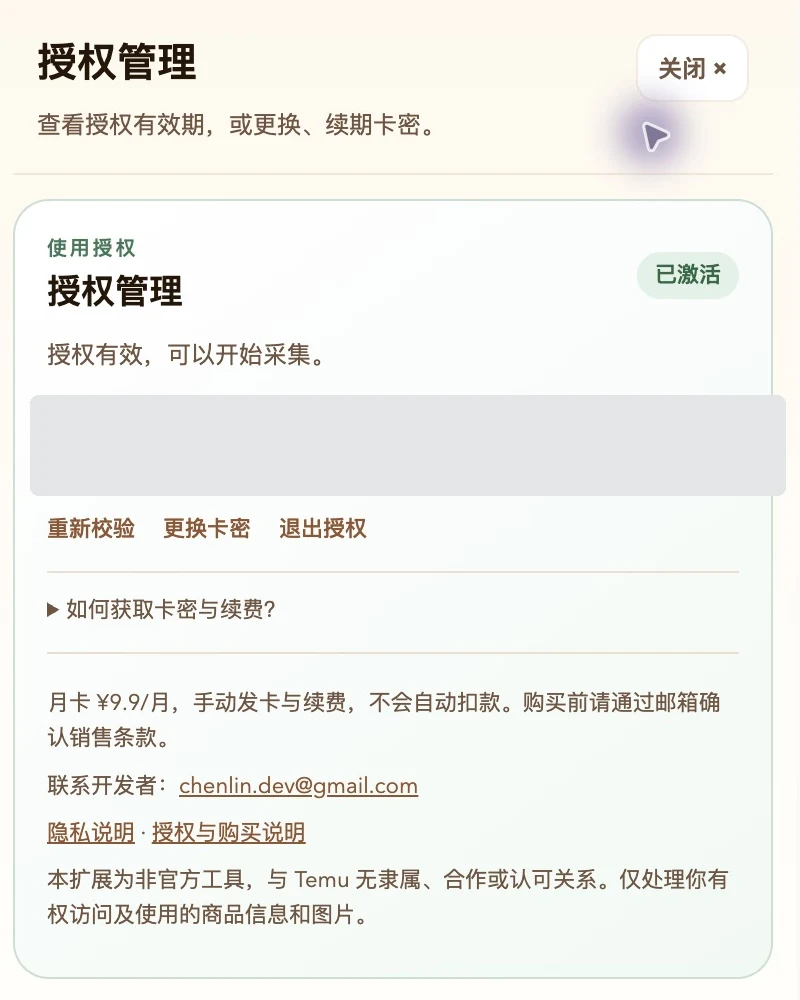
- Open 授权管理 (License management). Expand the purchase and renewal help if you still need a key.
- Paste your license key, follow the prompts and select 激活并开始使用 (Activate and start). Once the status shows 已激活 (Active), close the panel to return.
Renew and revalidate
After renewing your existing key, select 重新校验 (Revalidate) to update the displayed expiry. Use 更换卡密 (Replace key) if you received a new key.
First collection
Collect the current list
- Open the TEMU product list you want to organize and wait for the cards to load.
- Select 开始采集 (Start collecting). Some interface versions show 开始抓取. When the completion message and item count appear, review a few results.
Pick individual products
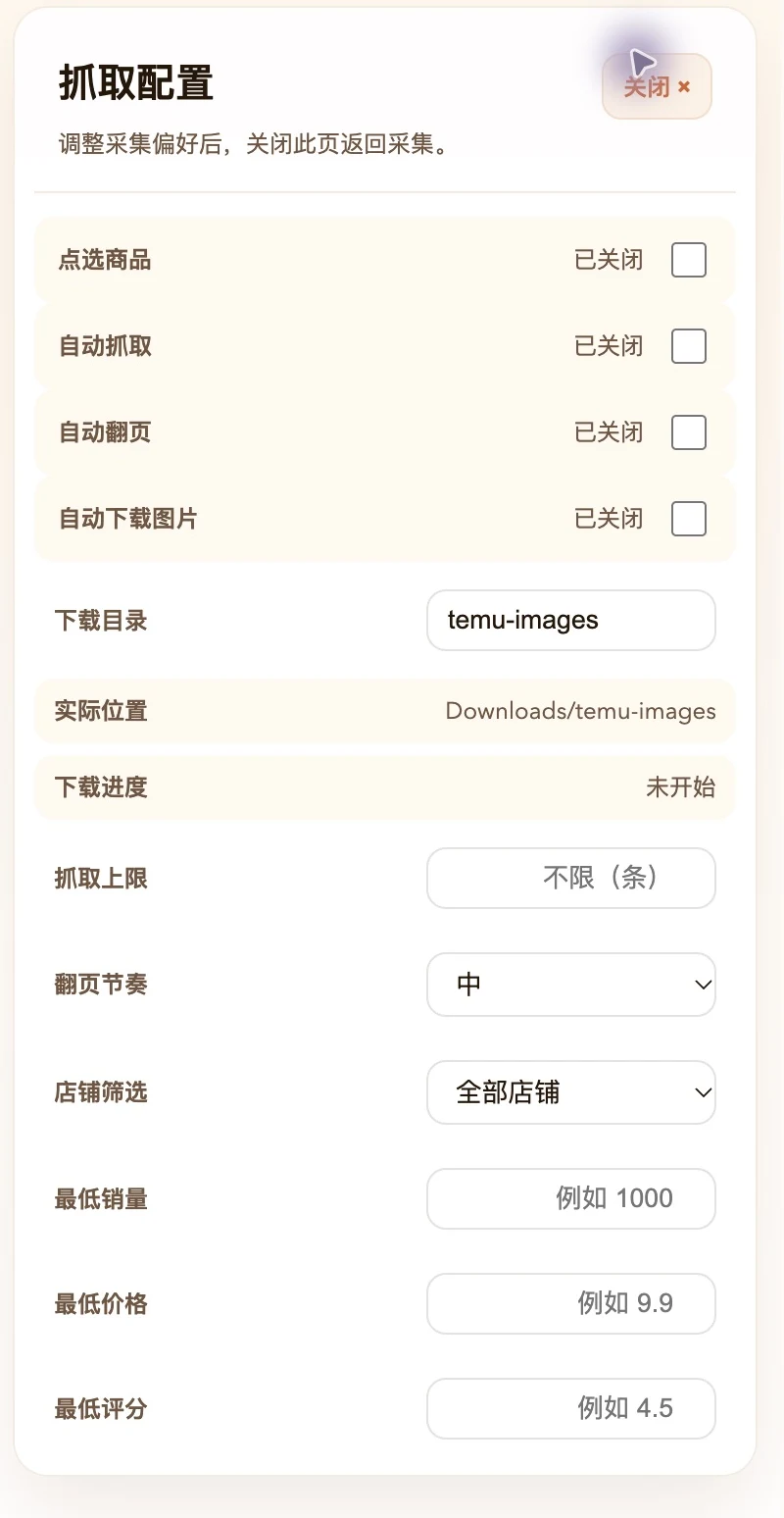
For a smaller shortlist, open Settings and enable 点选商品 (Point-and-pick). Click product cards on the page and confirm they appear in the sidebar. Switch the mode off to restore regular clicks.
Filters and pagination
Set filter criteria
Open Collection settings to narrow the list by store, minimum sales, minimum price and minimum rating. Leave a minimum blank to clear it.
For example, enter 4.5 for Minimum rating and 10 for Minimum price, using the currency shown on the page. Return to the sidebar to see items that match both.
Set pagination and limits
To read further into a list, set the collection limit and pagination pacing before enabling automatic pagination. Strong means longer waits. The limit is a stopping condition for pagination, so an individual read can exceed it.
Export and save images
Export CSV
- Return to the collection panel and verify the result count. Select 导出 CSV to save the filtered list.
- Open the file in Excel or another spreadsheet app. If text looks garbled, import it as UTF-8 with commas as separators. Images are represented as links in the CSV.
Download images
In Settings, enable 自动下载图片 (Automatic image downloads), confirm the folder, then collect. Use the displayed path and the browser download history to find the files.
Product details
Copy fields and summary
- Open an individual TEMU product page, then open the sidebar. Once it loads, select 重新解析详情 (Reparse details) to refresh the collected information.
- Use the card prompts to copy the title, price or other fields. Click a thumbnail to copy one image link, or copy all main image links together.
- Select 复制摘要 (Copy summary) to take the key details into another tool.
Troubleshooting
- Why is Export disabled?
- Collect a list and check that some items pass the filters. On a product detail page, use the copy controls instead.
- Fewer results than expected?
- Check that the list has loaded, then review the store and minimum criteria. Temporarily clear the filters to inspect the original count.
- License verification failed?
- Check the connection, license key and expiry, then revalidate. If you need help, contact the developer.
Settings and field reference
Expand a group to look up a particular control, license status or CSV field.
Collection and list controls8 entries
Operate these controls after opening the side panel on a product page. List and detail views expose different actions.
Floating launcher / Start collection
- Purpose
- Access extension actions directly on the source page.
- Behavior and settings
- Expand the floating icon. Open side panel opens the panel; Start collection queues a current-page collection command for it.
- Example
- Use it from a category you are browsing, then inspect panel status.
- Effects and limits
- Unsupported or not-yet-loaded pages may have no launcher. This does not start background whole-site collection.
Open side panel / Open collection panel
- Purpose
- Keep collection controls and results beside the source page.
- Behavior and settings
- Use the floating page entry or the extension toolbar entry. The popup offers quick preferences; the side panel shows full results. Check the active marketplace after switching tabs.
- Example
- Open the panel beside a category list to compare source cards with collected records.
- Effects and limits
- Opening the panel does not make every page recognizable or create an Excel batch.
Settings / Collection settings
- Purpose
- Configure collection mode, filters and image downloads.
- Behavior and settings
- The gear opens a separate settings page; close it to return to collection. Each control applies its own change without a separate global Save button.
- Example
- Leave automatic tasks off for an initial small collection, then adjust the needed controls.
- Effects and limits
- List-only filters and selection may be hidden in detail view. The toolbar popup contains only a subset of the full side-panel settings.
Start collection
- Purpose
- Read recognizable, loaded product cards on the current supported page.
- Behavior and settings
- Each read updates the panel with the current page results. Cards removed from the source DOM are not guaranteed to remain. Links are deduplicated within a read; a valid license is required.
- Example
- Let one page load, then click once. Export a previous list first if you need to retain it.
- Effects and limits
- This is not a whole-site search or cloud task. Unloaded cards, strict filters or an unavailable source can return zero. The button is disabled during point-and-pick.
Status / Product count
- Purpose
- Distinguish collection, completion, filtering and errors.
- Behavior and settings
- A count such as 12/40 means 12 visible records out of 40 held records. CSV exports the visible selection. Read the status text as well as the count.
- Example
- If the count drops after changing minimum rating, check whether it reports visible versus total records.
- Effects and limits
- Product count is neither sales volume nor page count. One product in detail view can contain many fields.
Select a result card
- Purpose
- Match a side-panel record with its source-page product.
- Behavior and settings
- Clicking a list card attempts to locate and highlight that product on the current page. Use the source page’s own product link when you want to enter its detail page.
- Example
- Locate a source card when checking an unexpected price.
- Effects and limits
- This operates on the current page. Navigation, virtualized lists or removed cards may prevent a match.
Export CSV
- Purpose
- Save the currently visible, filtered list as a text spreadsheet.
- Behavior and settings
- The button generates UTF-8 CSV with one visible product per row and separate data columns. Images are URLs. The control is disabled for zero records; detail view uses copy actions instead.
- Example
- Filter by rating, export your shortlist and import it using UTF-8 with comma separation.
- Effects and limits
- CSV embeds no images and preserves no Excel formatting or source workbook. Hidden records are excluded. Import long IDs as text to avoid scientific notation.
Clear data / Clear detail
- Purpose
- Empty current panel results before another collection.
- Behavior and settings
- Clears the list or detail and resets its filters. Exported files, downloaded images and persistent preferences are not all deleted. Enabled automatic tasks may repopulate results.
- Example
- Export CSV before clearing. Turn automatic tasks off first if you want collection to stop.
- Effects and limits
- Do not use the panel as a backup recovery mechanism. Ozon batches and source workbooks are managed separately.
Every collection preference13 entries
Unless stated otherwise, these configure the manual side-panel list. Filters generally change visibility; they do not supply data absent from the source.
Point-and-pick
- Purpose
- Collect only cards you deliberately select, suitable for a small manual shortlist.
- Behavior and settings
- Enable it and click source cards repeatedly. New selections appear first; selecting the same link again moves it to the front. Turn it off to restore normal clicks. Whole-page collection is disabled while it is active.
- Example
- Pick three candidates instead of collecting every card on a page.
- Effects and limits
- Filters can still hide selected products. Selected items may trigger enabled image downloads. This is not a site-wide checkbox selection.
Auto-collection
- Purpose
- Refresh the current list without repeatedly clicking Start.
- Behavior and settings
- Enabling it triggers an immediate read, then attempts another roughly every five seconds. Reads do not overlap. It does not click Next; each read updates the current list.
- Example
- Use briefly when a permitted list is loading more cards, then turn it off.
- Effects and limits
- This is periodic reading, not a change-only trigger. It can replace picked or previous-page lists. Disabling it does not disable pagination.
Automatic pagination
- Purpose
- Visit further products on supported lists with less manual navigation.
- Behavior and settings
- Attempts the next page or Load more, waits according to Pagination pacing, then reads again. The panel reflects that read; old cards removed by the website are not guaranteed to accumulate.
- Example
- Collect the first page, set a small limit, then enable pagination. Turn it off and inspect results when finished.
- Effects and limits
- A recognizable Next or Load more control must exist. Enabling pagination cannot repair an unsupported page. Stop on verification or access restrictions.
Automatically download images
- Purpose
- Send collected image URLs to Chrome for saving.
- Behavior and settings
- Off initially. Enabling waits for another collection. List reads use visible products; detail reads use parsed main images. Editing a filter alone does not download all earlier images.
- Example
- Leave off for text research. Enable after checking the shortlist and folder, then run a collection.
- Effects and limits
- May create many files and requests. Picked items have their own trigger path, so do not assume a filtered-out selection cannot download. Check Chrome Downloads for final file status.
Download directory
- Purpose
- Choose a subfolder beneath the browser download directory.
- Behavior and settings
- Defaults to temu-images. Enter a relative folder such as research/session-a and finish editing. Invalid path characters are normalized; blank input restores the default.
- Example
- Use research/session-a to separate one collection’s files from other work.
- Effects and limits
- This cannot write to an arbitrary absolute system path. Changing it affects future downloads and does not move or rename existing files.
Actual location
- Purpose
- Preview the destination implied by the folder preference.
- Behavior and settings
- For example, Downloads/research/session-a. This read-only label follows Download directory.
- Example
- Look for the indicated subfolder, then verify individual files in Chrome Downloads.
- Effects and limits
- Downloads describes the browser destination convention, not a guaranteed system folder; your browser configuration still controls its download root.
Download progress
- Purpose
- See whether image work started and how many requests succeeded, failed or were skipped.
- Behavior and settings
- Off means disabled; Waiting means no new trigger. Skips can reflect deduplication or download history. Investigate failures in Chrome and at the source.
- Example
- If collection worked but no files appeared, check for skipped requests and inspect Chrome Downloads.
- Effects and limits
- Image counts differ from product counts. Some panel versions count accepted download requests, so Completed alone does not prove every file finished writing. Clearing products does not clear download history.
Collection limit
- Purpose
- Set a product-count stopping condition for list pagination.
- Behavior and settings
- Blank or 0 means no limit. Version 1.1.1 checks the unfiltered current-list count around pagination and stops when reached. It is not a hard truncation or a guaranteed total across every historical page.
- Example
- With limit 100 and minimum rating 4.5, pagination may stop at 100 raw records even if only 20 pass the rating filter.
- Effects and limits
- Counts products, not pages, files or images. Lowering the limit cannot recover previously omitted records. TEMU can return more than the threshold in one read.
Minimum sales
- Purpose
- Hide list products whose displayed sales value is below a threshold.
- Behavior and settings
- Enter a non-negative number; blank disables the condition. Recognized k/thousand and similar units are normalized. Unrecognized sales participate as 0.
- Example
- At threshold 1000, a recognized 1.2k can pass; products with no displayed sales may disappear.
- Effects and limits
- No private sales database is queried. Reviews are not sales. Source labels can represent monthly, cumulative or approximate values; verify their meaning.
Minimum price
- Purpose
- Set a lower displayed-price threshold to exclude cheaper candidates.
- Behavior and settings
- Accepts non-negative decimals. Compares the recognized page number in its displayed currency, without currency conversion. Blank disables it; missing prices may be treated as 0 and excluded.
- Example
- At threshold 10, 8.5 is hidden and 12 can remain. This does not select products priced below 10.
- Effects and limits
- Not a maximum price, cost price or delivered total. Check coupons, memberships and variants. All active thresholds must pass together.
Minimum rating
- Purpose
- Hide lower-rated list products to narrow manual review.
- Behavior and settings
- Accepts 0–5 with 0.1 increments; out-of-range input is clamped. Blank disables filtering. Missing ratings compare as 0.
- Example
- With 4.5, a 4.4 is hidden while 4.5 and 4.8 can pass; combine with sales if useful.
- Effects and limits
- Compares displayed rating only, without adjusting for review count or authenticity. High scores based on few reviews can still pass.
Pagination pacing: weak / medium / strong
- Purpose
- Adjust waiting between pagination rounds and before reading the new page.
- Behavior and settings
- Medium by default. Weak: about 10–16 seconds between rounds and 3.5–6 after navigation; medium: 15–26 and 5.5–9; strong: 26–42 and 8–13. Total elapsed time also includes loading and collection.
- Example
- Use Strong for slow pages. For a small sample, set a collection limit rather than increasing request frequency.
- Effects and limits
- Strong means a longer wait, not more intensive scraping. It does not change the roughly five-second auto-collection timer or guarantee avoidance of restrictions.
Store filter / All stores
- Purpose
- Show one recognized store within the current results.
- Behavior and settings
- Options are derived from store fields in current records. The selection combines with numerical filters; All stores removes it. Disabled during point-and-pick.
- Example
- Select a store in a mixed list, then export its products that also pass other conditions.
- Effects and limits
- Does not search the marketplace for every product from that store. Missing fields and changing lists affect options. A brand label is not automatically a verified seller identity.
Detail-view copy functions8 entries
Open a supported product detail page for parsing, or use Reparse detail. These actions copy text or links and do not place orders.
Reparse detail
- Purpose
- Read the current product again instead of appending to a list.
- Behavior and settings
- Rebuilds the title, pricing, rating, description, store and image view. Detail mode shows one product and hides list filters and CSV.
- Example
- Reparse after selecting a variant or allowing the page to finish loading, then compare with the source.
- Effects and limits
- Only currently loaded content is parsed. Async sections or variant prices may lag. Detail view replaces the list view, so export a needed list first.
Product title: click to copy
- Purpose
- Copy the recognized title on its own.
- Behavior and settings
- Click the marked title area to write text to the clipboard. Status reports success; select text manually if copying fails.
- Example
- Paste a title into your research notes as a search reference.
- Effects and limits
- Keeps the page language without translating, rewriting or assessing trademark rights.
Price: click to copy
- Purpose
- Copy the displayed price and any recognized original price.
- Behavior and settings
- The price section copies combined text, including an original price only when recognized. Ozon batch dual prices have dedicated fields.
- Example
- Compare with your own costs while retaining currency and offer conditions.
- Effects and limits
- Not a checkout quote. Shipping, tax, account offers, quantity and variants can change the payable amount.
Ratings and sales: click to copy
- Purpose
- Copy recognized rating, review count and sales information together.
- Behavior and settings
- Click the section to copy available values. Missing metrics are not estimated.
- Example
- Record review volume alongside rating when evaluating a candidate.
- Effects and limits
- Reviews, product sales and store sales are distinct and cannot substitute for verified transaction data.
Single image / Copy all links
- Purpose
- Copy main-image URLs into your own records.
- Behavior and settings
- Click a thumbnail for one URL, or Copy all links for newline-separated recognized URLs. Use download settings when files are needed.
- Example
- Copy one thumbnail URL for a reference, or all links for the recognized gallery.
- Effects and limits
- Copies URLs rather than files or usage rights. Sources may restrict or expire links. Long description images, videos and every variant image are not guaranteed.
Product description: click to copy
- Purpose
- Copy recognized features or description as text.
- Behavior and settings
- Click the description area. Recognized separated content is displayed as lines; unavailable content stays missing.
- Example
- Copy material or size information into an internal checklist and verify it at source.
- Effects and limits
- Does not validate claims, invent missing specifications or guarantee every collapsed section is included.
Store information: name and link
- Purpose
- Keep visible seller information for source checking.
- Behavior and settings
- Click the marked area to copy the store name; open a store link separately when present. Other visible metrics appear only when recognized.
- Example
- Record seller name and source link to distinguish sellers of the same brand.
- Effects and limits
- Not a backend seller verification. Missing store information is not filled with a recommended product’s seller.
Copy summary
- Purpose
- Copy the main recognized detail fields in one action.
- Behavior and settings
- Combines title, link, prices, metrics, store information, description and image URLs as multiline text.
- Example
- Paste a product summary into your research document, then add your own assessment.
- Effects and limits
- A summary combines current parsed fields only. It is neither an Excel file nor a verified factual report.
TEMU license controls10 entries
Applies to 1.1.1. License management and collection settings are separate pages; online validation needs connectivity.
License state / Expiry
- Purpose
- Distinguish usable access, expiry and connectivity errors.
- Behavior and settings
- Active shows expiry; Inactive needs a key; Checking needs time; Expired needs renewal and validation. Invalid, Disabled or Binding mismatch require support. Unconfigured, Connection error, Verification error and Validation failed have separate diagnostic messages.
- Example
- Revalidate after connectivity returns; dismissing a notice cannot extend an expired term.
- Effects and limits
- Time uses browser-local formatting. Connection errors are not the same as expiry, and repeated key replacement does not resolve every error.
License management / Close
- Purpose
- Review status and expiry or access activation controls.
- Behavior and settings
- The license icon opens this page; Close returns to collection. Available tools depend on activation state.
- Example
- Check whether the state is Active or Connection error when collection is unavailable.
- Effects and limits
- Opening the page does not buy service or extend a license. Redacted screenshot expiry is not a promised purchase term.
License key / Authorization code
- Purpose
- Enter the complete license supplied by the developer.
- Behavior and settings
- Masked by default. Surrounding whitespace is trimmed; embedded spaces or line breaks are rejected. It is not an order number or payment password.
- Example
- Paste the supplied full key into your own browser.
- Effects and limits
- Never publish a key in comments or screenshots. This website has no license-key collection form.
Show / Hide key
- Purpose
- Check pasted characters while controlling on-screen visibility.
- Behavior and settings
- Only toggles masking. It does not activate, replace or renew the key.
- Example
- Reveal briefly to check a missing character, then hide it again.
- Effects and limits
- Hide before sharing a screen. Masking is not deletion and does not clear copied clipboard contents.
Data-processing consent / Privacy notice
- Purpose
- Review and acknowledge the license-validation data flow.
- Behavior and settings
- The notice covers sending the key and random browser installation ID to KeyAuth for validation, expiry and instance binding, with encrypted local key storage. Submission requires consent when requested.
- Example
- Read the notice, then consent only if you accept that validation flow.
- Effects and limits
- This is not a product-data upload switch or permission to reuse marketplace content.
Activate and start / Validate replacement
- Purpose
- Validate the supplied key online for collection access during its valid term.
- Behavior and settings
- Protected operations become available after successful validation. The button is disabled while checking; expiry, invalidity, binding and connectivity have distinct states.
- Example
- Use for initial activation; after a term extension, revalidate to retrieve the update.
- Effects and limits
- Activation is not payment or automatic renewal. Contact support for a binding mismatch rather than assuming reinstalling will fix it.
Revalidate / Consent and revalidate saved key
- Purpose
- Refresh validity, expiry and status for the saved license.
- Behavior and settings
- Checks the saved key online. Review any renewed consent request first. It generates no new key and makes no payment.
- Example
- Revalidate after support extends the term, then inspect expiry and Active status.
- Effects and limits
- Connection errors do not necessarily mean invalid keys. Distinguish network, expiry, disabled and binding states.
Replace key / Cancel replacement
- Purpose
- Enter a different key, or abandon that input.
- Behavior and settings
- Replace opens the form; replacement requires successful submission and validation. Cancel exits and clears the newly entered value.
- Example
- Replace only when you have another key; cancel an accidental form opening without signing out.
- Effects and limits
- Does not imply a refund, unbinding or stacking the old and new terms. Follow actual status and sales terms.
Sign out of license
- Purpose
- Remove the saved key from this browser and stop using that authorization.
- Behavior and settings
- Collection access becomes unavailable until activation. Installation identity, encryption material and consent records are not all removed by sign-out.
- Example
- Finish automatic collection before signing out when you want to stop using the license here.
- Effects and limits
- Does not unbind the server instance, erase server records, issue a refund or remove product files.
How to obtain a key and renew
- Purpose
- Find the contact route for obtaining or extending a license.
- Behavior and settings
- Explains contacting the developer and revalidating after extension. The notice states CNY 9.9/month, manually renewed, without automatic charging.
- Example
- Confirm current price, delivery, term and binding arrangements via chenlin.dev@gmail.com before purchase.
- Effects and limits
- Opening help makes no payment. Follow terms confirmed before purchase and never send payment passwords.
Every CSV column20 entries
Field explanations follow the current exporter. Examples illustrate meaning rather than real product data.
Export identifier: id · id
- Purpose
- Uses a product ID parsed from its link, falling back to the exported row number.
- Behavior and settings
- A separate list-CSV column populated from currently visible recognized products. Unavailable values can be blank.
- Example
- A numeric value may be a product ID or only the current file’s row index.
- Effects and limits
- Not guaranteed unique across exports; retain product links for durable matching.
Product title · title
- Purpose
- Recognized source title for searching and distinguishing records.
- Behavior and settings
- A separate list-CSV column populated from currently visible recognized products. Unavailable values can be blank.
- Example
- For example, “Example organizer”, in the source language.
- Effects and limits
- No automatic translation, brand removal or commercial-use verification.
Displayed price · price
- Purpose
- Recognized current page price in its displayed context.
- Behavior and settings
- A separate list-CSV column populated from currently visible recognized products. Unavailable values can be blank.
- Example
- For example 12.50; check currency and conditions at source.
- Effects and limits
- No automatic currency conversion or guarantee of a tax/shipping-inclusive total.
Sales text · sales
- Purpose
- Source sales label used for reference and minimum-sales filtering.
- Behavior and settings
- A separate list-CSV column populated from currently visible recognized products. Unavailable values can be blank.
- Example
- For example “1.2k sold”; verify the time period.
- Effects and limits
- Not an order count estimated from reviews; can be blank.
Rating · rating
- Purpose
- Source product rating used by minimum-rating filtering.
- Behavior and settings
- A separate list-CSV column populated from currently visible recognized products. Unavailable values can be blank.
- Example
- For example 4.6, considered alongside review count.
- Effects and limits
- Not a store rating or reliability-adjusted score.
Review count · comments
- Purpose
- Displayed review count or review-count text.
- Behavior and settings
- A separate list-CSV column populated from currently visible recognized products. Unavailable values can be blank.
- Example
- For example “235 reviews”, retaining its label.
- Effects and limits
- Distinct from units sold and not used to estimate sales.
List image URL · img
- Purpose
- Representative image URL recognized from a product card.
- Behavior and settings
- A separate list-CSV column populated from currently visible recognized products. Unavailable values can be blank.
- Example
- CSV stores an https://… URL; download separately for a file.
- Effects and limits
- Not an embedded image; list thumbnails can be smaller than detail-gallery images.
Product link · link
- Purpose
- Source URL used for checking, association and deduplication.
- Behavior and settings
- A separate list-CSV column populated from currently visible recognized products. Unavailable values can be blank.
- Example
- Retain the link column as text for source checks.
- Effects and limits
- Redirects, removal and regional restrictions can make a link unavailable.
Original / pre-offer price · originalPrice
- Purpose
- Separate reference price displayed beside the current price.
- Behavior and settings
- A separate list-CSV column populated from currently visible recognized products. Unavailable values can be blank.
- Example
- For example current 12 and original 18 remain distinct.
- Effects and limits
- A struck-through price does not prove historical transactions at that amount.
Ad label · adBadge
- Purpose
- Recognized advertising label for distinguishing promoted placements.
- Behavior and settings
- A separate list-CSV column populated from currently visible recognized products. Unavailable values can be blank.
- Example
- Retains the label when recognized; otherwise blank.
- Effects and limits
- A blank label does not prove the item was not advertised.
Product badge · badge
- Purpose
- Source badge text retained as context.
- Behavior and settings
- A separate list-CSV column populated from currently visible recognized products. Unavailable values can be blank.
- Example
- For example a bestseller-style label when actually shown.
- Effects and limits
- Not an extension-issued quality certificate or sales ranking.
Price label · priceTag
- Purpose
- Text associated with the page’s price or offer.
- Behavior and settings
- A separate list-CSV column populated from currently visible recognized products. Unavailable values can be blank.
- Example
- Review the label when evaluating an offer price.
- Effects and limits
- Does not determine whether offers stack or apply at checkout.
Local fulfillment label · local
- Purpose
- Recognized source label for local fulfillment.
- Behavior and settings
- A separate list-CSV column populated from currently visible recognized products. Unavailable values can be blank.
- Example
- Retains a local-shipping label when shown.
- Effects and limits
- Not warehouse stock, a verified dispatch address or a delivery guarantee.
Promotion text · promotion
- Purpose
- Promotion or offer text on the list.
- Behavior and settings
- A separate list-CSV column populated from currently visible recognized products. Unavailable values can be blank.
- Example
- Keep offer wording alongside the price for context.
- Effects and limits
- Offers can vary by account, region and time.
Promotion countdown · promotionEndsIn
- Purpose
- Recognized remaining-time text at collection time.
- Behavior and settings
- A separate list-CSV column populated from currently visible recognized products. Unavailable values can be blank.
- Example
- For example “2 hours left” is a source-page snapshot.
- Effects and limits
- Exported text does not keep counting down or verify the actual deadline.
Voucher text · voucher
- Purpose
- Recognized coupon wording from the card.
- Behavior and settings
- A separate list-CSV column populated from currently visible recognized products. Unavailable values can be blank.
- Example
- Retains a displayed coupon amount or offer label.
- Effects and limits
- Does not claim, redeem or guarantee eligibility for a coupon.
Stock label · stock
- Purpose
- Visible stock-related source text.
- Behavior and settings
- A separate list-CSV column populated from currently visible recognized products. Unavailable values can be blank.
- Example
- For example a low-stock message, interpreted in its source context.
- Effects and limits
- Not a real-time inventory API or a full available quantity.
Delivery text · delivery
- Purpose
- Recognized delivery wording from the list.
- Behavior and settings
- A separate list-CSV column populated from currently visible recognized products. Unavailable values can be blank.
- Example
- Check an estimated arrival or dispatch label against the destination.
- Effects and limits
- Not shipment tracking or a delivery promise by the developer.
Store · store
- Purpose
- Recognized store name used by the list’s store filter.
- Behavior and settings
- A separate list-CSV column populated from currently visible recognized products. Unavailable values can be blank.
- Example
- Filter a mixed list by its recognized store field.
- Effects and limits
- May be blank; a brand name is not a guaranteed substitute.
Brand · brand
- Purpose
- Recognized brand text, kept separate from the seller.
- Behavior and settings
- A separate list-CSV column populated from currently visible recognized products. Unavailable values can be blank.
- Example
- A brand can be sold by multiple stores; retain both concepts.
- Effects and limits
- Does not verify brand authorization, trademark rights or seller identity.